Books

UPSC OTR 2026 simplifies applications with One-Time Registration. Online applications via UPSC OTR are open from 4th to 24th February 2026. Prelims on 24th May, Mains from 21st August. Check eligibility, required documents, and a clear step-by-step guide to complete OTR, generate login credentials, and apply for all UPSC exams easily.

The UPSC Civil Services Examination 2026 notification was released on 4th February 2026, announcing 933 vacancies for top posts like IAS, IPS, IFS, and other Group A services. The online application is open from 4th to 24th February 2026. The Prelims is scheduled for 24th May 2026, followed by the Mains from 21st August 2026. Aspirants must carefully check the notification for eligibility, exam pattern, and instructions. Registration through UPSC OTR is mandatory for all candidates to simplify the application process.
The UPSC Notification 2026 for the Civil Services Examination has been officially released on 4th February 2026, announcing 933 vacancies across various prestigious services. The online application process began on 4th February 2026 and will continue until 24th February 2026 on the official UPSC website.
| Activity | Dates |
|---|---|
| OTR Start Date | 4th February 2026 |
| OTR Last Date | 24th February 2026 |
| Correction Window | To be announced soon |
UPSC OTR Registration, or One-Time Registration, is a convenient system introduced to simplify the application process for various UPSC exams. It allows candidates to create a single profile with all their essential details, which can be reused for future exam applications. By registering on the UPSC OTR portal, aspirants save time and avoid repetitive entry of information for each exam. This centralized process ensures data accuracy and provides a hassle-free experience for candidates planning to appear for UPSC exams like Civil Services, NDA, and others.
| UPSC OTR 2026 Overview | |
| Particular | Details |
| Application Start Date | 4th February 2026 |
| Application Closing Date | 24th February 2026 |
| Application Fee | No Application Fees |
| UPSC OTR Eligibility | Mandatory for those who wish to apply for any UPSC exam |
| Age Limit | No Age Limit For UPSC OTR Login |
| Official Website | upsc.gov.in and upsconline. nic.in |
The OTR Registration for UPSC involves a step-by-step process to create a centralized profile. Once registered, candidates can log in using their credentials and apply for various UPSC exams. OTR registration is a mandatory first step for all candidates appearing for UPSC exams, ensuring a streamlined approach to exam applications.
Follow these steps to set up your profile accurately and efficiently.
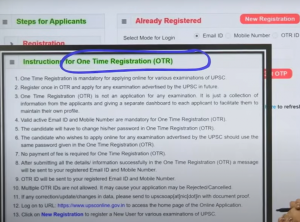
Step 1: Visit the Official UPSC Website
Go to the official UPSC website at upsconline.nic.in and click on the OTR (One-Time Registration) option on the homepage to begin the process.
Step 2: Create Your OTR Profile
If you’re registering for the first time, click on “New Registration,” or if you’re an existing candidate, log in using your Email ID or OTP-based login.
Step 4: Verify OTP
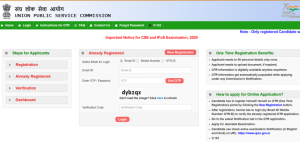
After submitting your email or mobile number, verify the OTP sent to your registered contact details.
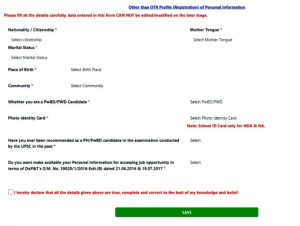
Step 5: Login and Start Form Filling
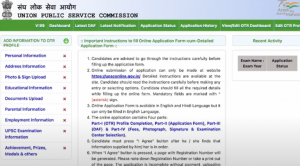
Log in to the exam dashboard using the password generated during OTR, review the prefilled details, and complete the remaining fields.
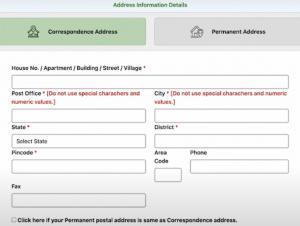
Step 6: Provide Address Information
Enter your correspondence and permanent address details. Check the box if both addresses are the same.
Step 7: Upload Photograph and Signature
Upload your passport-size photograph and signature as per the specified format and size guidelines.

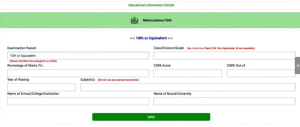
Step 8: Provide Educational Qualifications
Fill in your educational details, including your 10th-grade qualification and graduation or most recent semester details (if in the final year).
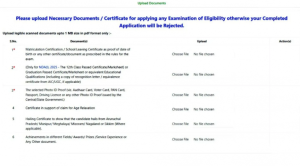
Step 9: Document Upload
Upload scanned copies of required documents like:
Step 10: Parent’s Information
Enter details of your parents, including their educational qualifications and occupations.
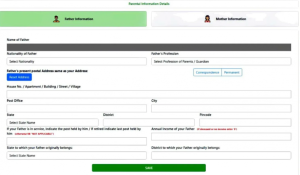
Step 11: Employment Information
Provide your current employment status and relevant job details if employed.
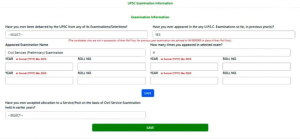
Step 12: UPSC Exam History
Mention any previous UPSC attempts, debarments, or disciplinary actions.
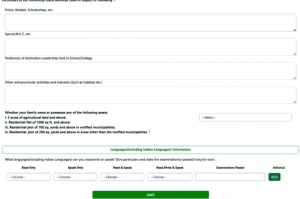
Step 13: Achievements and Recognitions
Detail any achievements, prizes, medals, or recognitions you have received in your academic or professional career.
To complete UPSC OTR registration, candidates must upload certain documents for verification. These include a scanned passport-sized photograph, signature, and valid photo ID proof (such as an Aadhaar card, PAN card, or passport). Additionally, candidates need to provide educational qualification details like 10th, 12th, and graduation certificates. Having these documents ready ensures a smooth registration process. Accurate and legible uploads are essential to avoid rejection of the application.
Filling the UPSC 2026 Application Form is a multi-step process that requires careful attention to detail. After completing Part 1: UPSC OTR 2026 (One-Time Registration), candidates can proceed to Part 2: Detailed Application Form (DA). Here’s a step-by-step guide:
For any issues with OTR or the application process, contact UPSC’s dedicated helpline:
The UPSC OTR (One-Time Registration) system offers several advantages for candidates applying for UPSC exams. It simplifies the process, reduces errors, and provides a centralized platform for managing multiple applications. Here are the key benefits:
The UPSC One-Time Registration (OTR) process is simple, but small mistakes can lead to big issues. Here are some common errors to avoid for a hassle-free experience:
Explore UPSC Test Series

UPSC OTR Registration is a one-time process for creating a centralized profile, enabling candidates to apply for multiple UPSC exams without re-entering basic information.
The UPSC Civil Services Examination 2026 notification was released on 4th February 2026, announcing 933 vacancies
Candidates need a scanned photograph, signature, and a valid ID proof like Aadhaar, PAN, or passport, along with educational qualification details.
Yes, candidates can log in to the OTR portal and update their details if required, ensuring accuracy in future applications.
You can access the UPSC OTR login through the official portal using your registered User ID and password.
Your registration number will be sent to your registered email ID and mobile number after completing the OTR process.
UPSC OTR (One-Time Registration) is a centralized system that allows candidates to create a single profile with all essential details. Start Date: 4th February 2026 Last Date: 24th February 2026



Explore SRIJAN Prelims Crash Course


Connect with our experts to get free counselling & start preparing
Books
Udaan (Prelims Wallah)
Prahaar (Mains Wallah)
Q&A Bank (Prelims & Mains)
Budget & Economic Survey
NCERT Wallah
Marks Booster
हिंदी माध्यम विशेष शृंखला
 Current Affairs
Monthly Current Wallah
Subject Wise Current Affairs
Editorial Analysis
Editorial PDFs
News of The Day
Download Our App



Download Our App
<div class="new-fform">
</div>

 GS Foundation
 Optional Course
 Combo Courses
 Degree Program