Books

How to fill UPSC online form: Step-by-step guide on OTR registration, Part 1 and Part 2 application, fee payment, document upload, and corrections.

It’s crucial to navigate through the process of filling out the UPSC online form seamlessly. In this guide, we’ll walk you through each step with clarity and precision, ensuring you sail through the application process smoothly. From understanding preconditions to tackling Part 1 and Part 2 of the form, and even handling corrections
UPSC conducts the Civil Services Examination once a year. To appear for the exams, one has to fill UPSC form in an online mode. Beginners usually face difficulties in filling the online form due to multiple steps involved in applying. Candidates can go through this article to understand all the steps involved before actually filling the form.
UPSC is a constitutional body that recruits for government services. This is the reason why candidates are required to provide documentation before their candidature is approved.
Following are the requirements before filling the application form:
The procedure for filing UPSC Civil Services Exam has undergone change in recent times. It is now a requirement to register oneself on the OTR application before proceeding with filling the form.
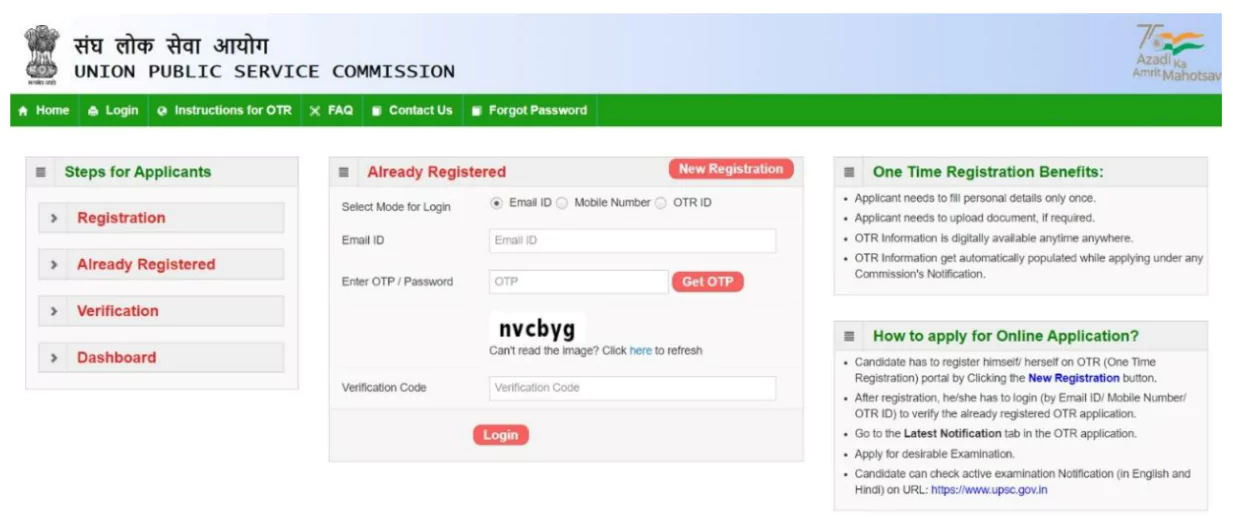
The Candidate has to fill the Part-1 of the application form before proceeding to the Part-2. Steps involved in filling the Part-1 of the application form is as follows:
Without filling the Part 2 of the exam, a candidature is invalid. It is therefore advised to fill Part 2 immediately after completing Part 1.
A candidate is required to pay a nominal fee for registering themselves for the UPSC exam. This amount does not apply to all candidates. Without paying the exam fee, the candidate is rejected. The fee structure is as follows:
| Category of Candidates | Prelims Fees | Mains Fees |
| General (Male) | ₹100 | ₹200 |
| General (Female) | No Fees | No Fees |
| OBC (Male) | ₹100 | ₹200 |
| OBC (Female) | No fees | No Fees |
| SC/ST (Male and Female) | No fees | No fees |
| PwBD | No fees | No Fees |
In case a candidate has made mistakes while filling the form, including uploading of the documents, they can make corrections during the correction window. The UPSC notifies the duration of the correction window, during which a candidate has to rectify errors. In case of major inaccuracies, candidates have to fill the form again, which involves filling the part 1 of the form and paying the examination fees to obtain a new Registration id.
Following the above instructions can avoid the mistakes that a candidate is likely to make while filling the form. It is advisable to read the instructions provided by the UPSC before the application form is filled, else it can lead to problems in the future.
| Must Read | |
| NCERT Notes For UPSC | UPSC Daily Current Affairs |
| UPSC Blogs | UPSC Daily Editorials |
| Daily Current Affairs Quiz | Daily Main Answer Writing |
| UPSC Mains Previous Year Papers | UPSC Test Series 2024 |
Explore UPSC Test Series

A candidate has to visit the official website of the UPSC and click on the Civil Services notification link to reach the application page. After registering on the OTR portal, the candidate can read the instructions provided before filling the form.
The application fee of UPSC varies according to the category of the candidates. For males belonging to the general and OBC categories, the fee is ₹100 for prelims and ₹200 for Mains.
The link for filling UPSC form is active from the day of notification and remains open till the closure day. The candidate is advised not to hurry to fill the form.
A candidate is required to use information such as email id, mobile number and OTR id before logging into the account.
Yes. UPSC provides a correction window for candidates to make corrections in their application form. This is open for a limited duration.


Explore SRIJAN Prelims Crash Course


Connect with our experts to get free counselling & start preparing
Books
Udaan (Prelims Wallah)
Prahaar (Mains Wallah)
Q&A Bank (Prelims & Mains)
Budget & Economic Survey
NCERT Wallah
Marks Booster
हिंदी माध्यम विशेष शृंखला
 Current Affairs
Monthly Current Wallah
Subject Wise Current Affairs
Editorial Analysis
Editorial PDFs
News of The Day
Download Our App



Download Our App
<div class="new-fform">
</div>

 GS Foundation
 Optional Course
 Combo Courses
 Degree Program