Books

Instruction for filling UPSC Application Form 2026 explains the complete online process, from OTR registration to form submission. Following official guidelines for details, document upload, and photo-signature size helps avoid errors and ensures successful application submission.

Instruction for Filling UPSC Application Form 2026: Filling the UPSC Application Form 2026 is the first and most crucial step for aspirants of the Civil Services Examination. The process is entirely online, and even minor errors in personal details, document uploads, or form submission can lead to rejection. Therefore, it is essential to carefully follow the official instructions. This guide provides a step-by-step overview of the application process, including URN registration, CAF submission, examination-specific modules, and the new 2026 live photo and signature requirements, ensuring a smooth and error-free application.
The UPSC application process is conducted entirely online through the official One-Time Registration (OTR) platform. Candidates must complete the OTR before proceeding to the specific exam application.
| UPSC Application Form 2026 Overview | |
| Feature | Details |
| Exam Body | Union Public Service Commission (UPSC) |
| Application Mode | Online Only |
| Registration Type | One-Time Registration (OTR) |
| Official Website | upsc.gov.in / upsconline.nic.in |
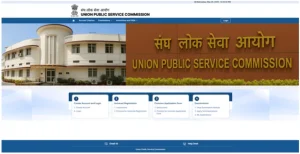
Before starting, ensure you have a stable internet connection and all necessary documents scanned according to official specifications.
Online Application Portal
Candidates must apply online only through the official UPSC application portal: https://upsconline.nic.in.
Before starting, carefully read the:
• General Instructions
• Profile/Module-wise Instructions
• Instructions for uploading documents
Application Components
While filling the application for the Civil Services Examination (CSE) 2026, candidates must complete all required modules, including:
Universal Registration Number (URN) Profile
Common Application Form (CAF)
Examination-Specific Module (including payment of fees and exam centre selection)
Mandatory Information & Documents
Applicants are required to provide accurate information and upload valid supporting documents for all claims (e.g., date of birth, educational qualifications, category certificate). Failure to submit complete information or the required attachments will lead to cancellation of candidature.
A. Live Photo Capture (Mandatory)
In addition to uploading a scanned photograph, candidates must capture a live photograph using their device camera or webcam while filling the CAF.
This live photo must be clear, well-lit, and match the uploaded photograph to ensure identity verification at later stages.
Any mismatch between the uploaded and live photo may lead to rejection of the application.
B. Scanned Photograph Upload
Photograph must be:
• JPG/JPEG format
• File size between 20 KB and 300 KB
• Plain white background
• Face fully visible and clear
• Neutral expression, eyes open, no dark glasses/shadow
C. Signature Upload
Applicants must:
• Sign three times (one below the other) using black ink on plain white paper
• Scan all three signatures together and upload as a single JPG/JPEG file
• Signature image must be clear, legible, and oriented correctly
Candidates must have details of a valid Photo ID Card (e.g., Aadhaar Card, Voter ID/EPIC, PAN Card, Passport, Driving Licence).
These details must be provided while completing the URN profile.
The same Photo ID must be carried to all examination stages for verification.
IMPORTANT RULES – SUBMISSION & CORRECTIONS
No withdrawal of the application is allowed once submitted.
No corrections, alterations, or modifications in any field of the Application Form are permitted after final submission.
Candidates should ensure all details and uploads are correct before finalizing the form.
ONE‑TIME URN PROFILE UPDATE
The Commission offers a one‑time facility to update/modify the URN profile.
Changes in URN will not affect already submitted applications — updated details will apply only to future applications once the URN is updated and re‑locked.
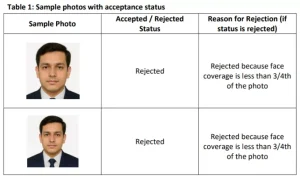
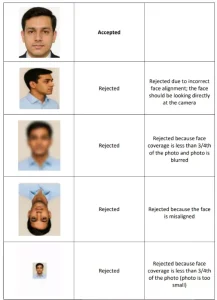
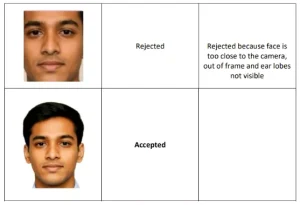
Properly uploading your photo and signature is critical to avoid rejection. Pay close attention to UPSC photo and signature instructions.
Photo Upload Instructions
Signature Upload Instructions
Check Out UPSC CSE Books
Visit PW Store
To ensure your application is “ready to go in one go,” avoid these common errors:
Ready to boost your UPSC 2026 preparation? Join PW’s UPSC online courses today!
Explore UPSC Test Series

The process involves four main stages: Account Creation, Universal Registration, Common Application Form (CAF), and Examination application.
No, once the URN is generated and locked, you cannot make changes to the Identity, Matriculation, or Aadhaar/Photo ID profiles.
For photos, JPG format, 20KB-200KB. For signatures, JPG format, 20KB-100KB, and 350-500 pixels dimensions.
Following instructions precisely helps avoid application rejection due to incorrect data, improper document uploads, or missed deadlines, ensuring a smooth application process.



Explore SRIJAN Prelims Crash Course


Connect with our experts to get free counselling & start preparing
Books
Udaan (Prelims Wallah)
Prahaar (Mains Wallah)
Q&A Bank (Prelims & Mains)
Budget & Economic Survey
NCERT Wallah
Marks Booster
हिंदी माध्यम विशेष शृंखला
 Current Affairs
Monthly Current Wallah
Subject Wise Current Affairs
Editorial Analysis
Editorial PDFs
News of The Day
Download Our App



Download Our App
<div class="new-fform">
</div>

 GS Foundation
 Optional Course
 Combo Courses
 Degree Program