
Issues Faced by UPSC Aspirants While Filling the UPSC Application Form 2026

Issues faced by UPSC aspirants while filling the UPSC application form include URN confusion, personal detail errors, wrong category selection, photo–signature upload problems, payment failures, exam centre issues, and technical glitches. Knowing these common mistakes and following the right steps can help candidates complete the form smoothly and avoid rejection.
Issues Faced by UPSC Aspirants While Filling the UPSC Application Form 2026

Issues faced by UPSC aspirants while filling the UPSC application form are quite common and often occur due to the complexity of the registration process. Many students struggle with understanding technical requirements, entering personal details correctly, choosing the right category, or uploading documents in the prescribed format. In several cases, lack of awareness, last-minute form filling, or confusion about rules leads to avoidable mistakes.

Since the UPSC application form has very limited scope for correction, these issues can create unnecessary pressure for aspirants. The UPSC 2026 application form is also expected to follow the same strict guidelines, making early awareness of these issues especially important for aspirants.

Issues Faced by UPSC Aspirants While Filling the UPSC Application Form

Filling out the UPSC application form is the first official step toward appearing in one of India’s most prestigious and competitive examinations. While the process is conducted online for convenience, many aspirants encounter challenges such as understanding eligibility criteria, entering accurate personal and academic details, uploading documents in the prescribed format, and meeting strict deadlines.

Even minor errors can lead to application rejection, making it essential for candidates to be attentive and well-informed. Being aware of the common issues faced during the application process can help aspirants avoid mistakes and ensure a smooth submission experience. Check some issues faced by UPSC Aspirants while filling the UPSC application form below.

Unique Registration Number (URN) Issues

The Unique Registration Number (URN) is generated during the One Time Registration (OTR) process and is required at every stage of the UPSC application. Any mistake related to the URN can delay form submission and create login problems, especially for first-time applicants.
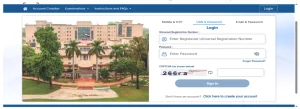
  • Many aspirants forget their URN or confuse it with the application number.
  • Creating multiple OTR accounts by mistake leads to login and verification problems.
  • Not saving URN and login credentials properly causes delays during form submission.\

What to do if you Forget your URN after Creating an Account:

  • Visit the UPSC OTR portal and click on the “Forgot Password” option.

issues faced while filling UPSC application form

  • Enter your registered email ID or mobile number to receive an OTP.
  • Verify the OTP and reset your password to regain access to your account.
  • Once logged in, note down your URN and save it securely for future use.

Errors in Personal Details

Personal details form the base of the UPSC application and are matched directly with official records during verification. Even small errors in names, dates, or educational information can create serious issues later, as UPSC does not allow major corrections after final submission.

  • Incorrect spelling of the candidate’s or parents’ names is a common mistake.
  • The wrong date of birth entered does not match the matriculation certificate.
  • Mismatch between educational details in the form and official documents can lead to rejection.
  • UPSC strictly verifies details, and major corrections are not allowed later.

Errors in personal details often go unnoticed during form filling, but they can result in application rejection if not checked carefully before final submission.

Incorrect Category Selection

Category selection is a sensitive part of the UPSC application form, as it directly affects reservation benefits and eligibility. Many candidates make mistakes here due to confusion about rules or certificate validity.

  • Selecting the wrong category (OBC, EWS, SC, ST) affects eligibility for reservation benefits.
  • Uploading outdated or invalid category certificates creates problems during verification.
  • Lack of clarity about OBC Non-Creamy Layer and EWS criteria leads to confusion.

How to Avoid It?

Before submitting the form, carefully check category rules on the UPSC notification 2026, ensure your certificate is valid for the current year, and confirm that it meets all eligibility conditions.

Photo and Signature Upload Problems

Uploading photographs and signatures is a technical step where many aspirants face rejection due to small but critical mistakes. Even minor deviations from UPSC guidelines can lead to the form being marked invalid.

  • Uploading images in the wrong format or incorrect file size causes rejection.
  • Blurry photos, poor lighting, or improper background are frequent issues.
  • Signature images not meeting UPSC guidelines are often rejected.
  • Live photo capture fails due to unclear face visibility or camera issues.

What to do if any issue occurs?

  • Recheck UPSC photo and signature specifications before uploading (format, size, clarity).
  • Use a good-quality camera or scanner with proper lighting and a plain white background.
  • Retry live photo capture using a stable device and internet connection.
  • If the upload fails repeatedly, clear browser cache or switch to another browser or device.
  • Complete photo and signature upload well before the deadline to avoid last-minute technical issues.

Examination Centre Selection Issues

Choosing an exam centre is an important part of the UPSC application process, as it directly affects travel and exam-day convenience. Many candidates face difficulties here mainly due to late form submission or lack of planning.

  • Preferred exam centres get filled quickly because centres are allotted on a first-come, first-serve basis.
  • Late applicants are often assigned centres far from their home city.
  • Poor planning creates last-minute travel and accommodation stress close to the exam date.
  • Candidates sometimes select a centre without checking connectivity, leading to reachability issues on exam day.

Solution for Exam Centre Selection Issues

  • Fill the UPSC application form as early as possible to get your preferred centre.
  • Select a centre that is easy to reach and has good transport facilities.
  • Check nearby alternative centres in advance in case the first choice is unavailable.
  • Plan travel and stay early if the allotted centre is in another city.

Payment-Related Problems

Payment is a crucial step in completing the UPSC application form, and even small issues can leave the form incomplete. Many aspirants face payment-related problems due to technical or procedural mistakes.

  • Payment failures occur due to slow internet or bank server issues.
  • Amount may be deducted, but the application status remains incomplete.
  • Not downloading or saving the payment confirmation causes confusion later.
  • Misunderstanding fee exemption rules leads to unnecessary payment errors.

What to do to Deal with Payment Issues?

  • Use a stable internet connection and avoid making payments during peak hours.
  • Always check the application status after payment to confirm it shows “Successfully Submitted.”
  • If the amount is deducted but the status is incomplete, wait for some time and then check again before making another payment.
  • Download and save the payment receipt or transaction ID for future reference.
  • Carefully read fee exemption rules to ensure you are eligible before proceeding with payment.

Technical Glitches on the UPSC Website

Technical issues are common on the UPSC website, especially as the application deadline approaches. High traffic and server load often interrupt the form-filling process and create unnecessary stress for aspirants.

  • Heavy traffic near the deadline causes slow loading and login errors.
  • Session timeouts occur if the form is left idle for too long.
  • Payment gateways may fail during peak hours.
  • Refreshing or reopening the form repeatedly leads to data loss.

How to Deal with Technical Glitches?

  • Fill and submit the application well before the last date to avoid peak-time traffic.
  • Use a reliable device and stable internet connection while filling the form.
  • Save each section after entering details to prevent data loss due to timeouts.
  • Avoid frequent refreshing or opening the form in multiple tabs.
  • If a payment gateway fails, wait for some time and recheck the payment status before retrying.

Prabitha Setu Consent Confusion

Many aspirants face confusion while giving consent for Prabitha Setu because the information is often misunderstood during form filling. Since this step involves data sharing, a casual decision can later cause uncertainty or regret.

  • Aspirants give consent without fully understanding data-sharing terms.
  • Consent is irreversible once submitted.
  • No option exists for partial data sharing, which creates concern later.

How to Deal with this Issue?

  • Read the Prabitha Setu consent details carefully before selecting “Yes” or “No.”
  • Understand that once consent is given, it cannot be changed later.
  • Decide only after knowing what data will be shared and for what purpose.
  • Avoid rushing through this section while filling the UPSC application form.

Casual Filling of Service Preferences

Many candidates treat service and cadre preferences as a formality and rush through this section. This often happens due to lack of awareness about how important these choices are for one’s future career.

  • Service and cadre choices are often filled without proper research.
  • Many aspirants do not consider long-term career goals while selecting preferences.
  • Once submitted, changes are not allowed during later stages.
  • Peer influence or online trends affect choices rather than personal interest and suitability.

How to Deal with This Issue?

  • Read the official service and cadre descriptions provided by UPSC carefully.
  • Understand the nature of work, posting locations, and growth opportunities for each service.
  • Align preferences with personal interests, strengths, and long-term career plans.
  • Take guidance from reliable sources or experienced candidates before final submission.

Misunderstanding About Correction Window

Many aspirants assume the correction window will fix every mistake made during form submission. This misunderstanding often leads to careless entries and avoidable errors in important details.

  • Many candidates believe major changes can be made later.
  • UPSC allows only limited corrections, not for core details.
  • Rushing through form filling due to this assumption leads to permanent errors.
  • Lack of awareness about what fields are editable and non-editable causes confusion.

How to Deal with This Issue

  • Read the official UPSC notification carefully to understand the scope of the correction window.
  • Fill the form slowly and double-check all core details before final submission.
  • Treat the correction window as a backup for minor edits, not a solution for major mistakes.
  • Keep all documents ready and verify details beforehand to avoid last-minute errors.

Check Out UPSC CSE Books

Visit PW Store

online store 1

Attempt Count Confusion

Many aspirants remain unsure about how UPSC counts attempts, which often leads to unnecessary worry during the application stage. This confusion usually arises from misinformation or incomplete understanding of exam rules.

  • Aspirants think filling the form counts as an attempt, which is incorrect.
  • An attempt is counted only when a candidate appears in the Preliminary Exam.
  • Lack of clarity about category-wise attempt limits causes unnecessary stress.

How to Deal with This Issue

  • Remember that an attempt is counted only when you appear in the Preliminary Examination, not when you fill the form.
  • Check the official UPSC notification for category-wise attempt limits and age criteria.
  • Avoid relying on rumors or social media claims; trust only official sources.
  • Keep track of your appeared attempts separately to stay confident and clear.

Ready to boost your UPSC preparation? Join PW’s UPSC online courses today!


Frequently Asked Questions

Does submitting the UPSC application form count as an attempt?

No, an attempt is counted only when a candidate appears for the Preliminary Examination. Simply submitting the application form does not count.

What if I forget my UPSC Unique Registration Number (URN)?

You can retrieve your URN using the "Forgot Password" option on the UPSC OTR portal. Verify with your registered email ID or mobile number.

Can I make corrections to my personal details after submitting the UPSC application form?

Generally, major corrections to personal details are not allowed after final submission. Candidates must carefully verify all information before submitting.

What are common *UPSC form filling issues with photo uploads?*

Common issues include incorrect file format (not JPG), wrong size, blurry images, improper background, and using old or edited photographs.

How can I avoid *UPSC server down issues when applying?*

To avoid server issues, submit your application well before the deadline and apply during off-peak hours, such as late at night or early morning.


Issues Faced by UPSC Aspirants While Filling the UPSC Application Form 2026

Enroll in SRIJAN Prelims Crash Course

Need help preparing for UPSC or State PSCs?

Connect with our experts to get free counselling & start preparing

Aiming for UPSC?

Download Our App

      
Quick Revise Now !
AVAILABLE FOR DOWNLOAD SOON
UDAAN PRELIMS WALLAH
Comprehensive coverage with a concise format
Integration of PYQ within the booklet
Designed as per recent trends of Prelims questions
हिंदी में भी उपलब्ध
Quick Revise Now !
UDAAN PRELIMS WALLAH
Comprehensive coverage with a concise format
Integration of PYQ within the booklet
Designed as per recent trends of Prelims questions
हिंदी में भी उपलब्ध

<div class="new-fform">


    </div>

    Subscribe our Newsletter
    Sign up now for our exclusive newsletter and be the first to know about our latest Initiatives, Quality Content, and much more.
    *Promise! We won't spam you.
    Yes! I want to Subscribe.